# Catalog

## Content Catalog

The catalog provides comprehensive control and traceability of all files managed by Nodeum within workflow orchestration. It includes files from primary storage added to the inventory, which is crucial for using the TCO Calculator prior to workflow management.

### Access and Storage Interface

Through a user-friendly interface, users can access data across various storage spaces:

* **Cache Storage**
* **Nearline Archive**: Data archiving on tapes.
* **Cold Archive**: Data protection on tapes.
* **Cloud and S3 Object Storage**

Fast search capabilities are enabled by utilizing both embedded file metadata and business metadata.

### Secure and Flexible Access

The system offers a secure method for external users to access the infrastructure, using access rights or as part of a more advanced access portal. This feature can be configured as a self-service option or with stricter controls, facilitating data sharing directly from within the Nodeum infrastructure.

### Indexed Content

The indexation engine offers native capabilities for indexing all metadata related to contents, tasks, reports, and data management statistics. By creating an index, it enables fast searching throughout the solution rather than searching through text.

The solution includes both a Solr-indexed engine and a Nodeum indexation engine service. The latter is designed to export all defined information from SQL and NoSQL databases to Solr, facilitating index creation.

The engine runs automatically.

{% hint style="info" %}
Sometimes, it's required to index the catalog.&#x20;
{% endhint %}

### User Management

The catalog uses the end user access rights to provide an easy and secure self-service portal. Any end user is allowed to manage their data straight through the Nodeum Ecosystem.

### Data Lifecycle Information <a href="#catalog-datalifecycle" id="catalog-datalifecycle"></a>

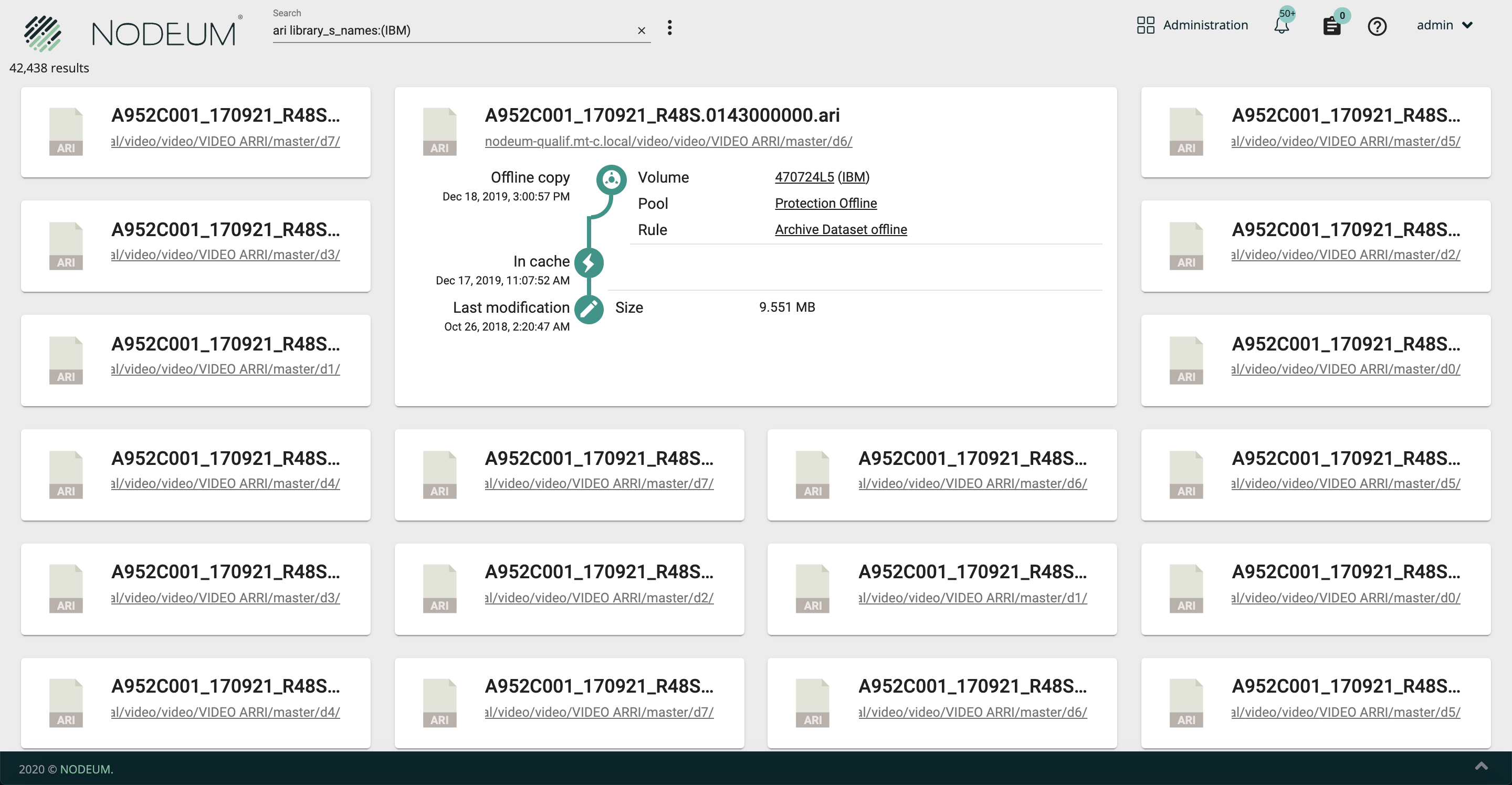
When opening a tile, all details about the file is available including its lifecycle. This display the different processed copies.

<img src="https://www.nodeum.io/hs-fs/hubfs/datelifecycle.png?width=2880&#x26;name=datelifecycle.png" alt="data lifecycle on files" width="2880">

#### Information Description

<table><thead><tr><th width="295">Value</th><th>Description</th></tr></thead><tbody><tr><td>Path</td><td>Path of the folder or file </td></tr><tr><td>Creation Date</td><td><ul><li>Creation date of Files or Folder </li><li>Place of Store (Primary Storage and its name)</li></ul></td></tr><tr><td>Last Modification Date</td><td>Last modification date of files or folfer and its size </td></tr><tr><td>Type of Task (Offline , active  Copy/move)</td><td><p>Ex. : it is the date of last offline copy done </p><p>You can see the following details :</p><ol><li>Target where the data are stored for NAS/Cloud backup</li><li>Volume if the file/Folder is store on Tape</li><li>Pool Name </li><li>Rule : name of task runned</li></ol></td></tr><tr><td>In cache</td><td><p>The file or folder are save in Active archive workflows.</p><p>The data is in cache save on a specfic container.<br>The user can open the files/Folder directly and bring modification.</p></td></tr></tbody></table>

### Search bar integration

The search bar is integrated into the catalog and some reports, including the Data Lifecycle and metadata reports. It helps you find data quickly and easily. You can use multiple filters to refine your search.

| Filter to refine the search                                                                          |                                                                                                                                                                   |
| ---------------------------------------------------------------------------------------------------- | ----------------------------------------------------------------------------------------------------------------------------------------------------------------- |
| Keywords                                                                                             |                                                                                                                                                                   |
| From File x size to x size                                                                           |                                                                                                                                                                   |
| From Change Date xx to                                                                               |                                                                                                                                                                   |
| From Modification Date xx to                                                                         |                                                                                                                                                                   |
| From Access Date xx to                                                                               |                                                                                                                                                                   |
| Container                                                                                            | Choose a Container from the list                                                                                                                                  |
| Primary Storage and if needed apply some filters to affine the selection (type of storage, pool..)   | <ul><li>Scanned represents the files inventoried but not used by workflow manager</li><li>Workflow represents the files managed by workflow into Nodeum</li></ul> |
| Secondary Storage and if needed apply some filters to affine the selection (type of storage, pool..) |                                                                                                                                                                   |
| Path                                                                                                 | complete the full path of the file                                                                                                                                |
| all levels                                                                                           | Only for the path, you see all files and folders                                                                                                                  |

&#x20;But you can also search data with special command :&#x20;

| Property list                   | Definition                         |
| ------------------------------- | ---------------------------------- |
| file\_id\_l                     | It is the internal file identifier |
| file\_parent\_id\_l             |                                    |
| file\_name\_s                   |                                    |
| file\_parent\_path\_s           |                                    |
| file\_base\_name\_s             |                                    |
| file\_extension\_s              |                                    |
| file\_size\_l                   |                                    |
| file\_type\_i                   |                                    |
| file\_change\_dt                |                                    |
| file\_modification\_dt          |                                    |
| file\_access\_dt                |                                    |
| file\_extern\_b                 |                                    |
| file\_in\_cache\_b              |                                    |
| file\_in\_cache\_dt             |                                    |
| file\_out\_cache\_dt            |                                    |
| user\_owner\_id\_l              |                                    |
| user\_can\_read\_b              |                                    |
| user\_can\_write\_b             |                                    |
| user\_can\_execute\_b           |                                    |
| group\_owner\_id\_l             |                                    |
| group\_can\_read\_b             |                                    |
| group\_can\_write\_b            |                                    |
| group\_can\_execute\_b          |                                    |
| other\_can\_read\_b             |                                    |
| other\_can\_write\_b            |                                    |
| other\_can\_execute\_b          |                                    |
| on\_primary\_pool\_b            |                                    |
| on\_secondary\_pool\_b          |                                    |
| prim\_id\_l                     |                                    |
| prim\_name\_s                   |                                    |
| prim\_container\_name\_s        |                                    |
| prim\_container\_id\_l          |                                    |
| prim\_container\_comment\_t     |                                    |
| prim\_pool\_name\_s             |                                    |
| prim\_pool\_id\_l               |                                    |
| prim\_pool\_comment\_t          |                                    |
| prim\_pool\_type\_i             |                                    |
| prim\_pool\_content\_i          |                                    |
| prim\_nas\_share\_name\_s       |                                    |
| prim\_nas\_share\_id\_l         |                                    |
| prim\_nas\_name\_s              |                                    |
| prim\_nas\_id\_l                |                                    |
| prim\_nas\_type\_i              |                                    |
| prim\_nas\_comment\_t           |                                    |
| prim\_nas\_price\_d             |                                    |
| prim\_cloud\_bucket\_name\_s    |                                    |
| prim\_cloud\_bucket\_id\_l      |                                    |
| prim\_cloud\_bucket\_price\_d   |                                    |
| prim\_cloud\_connector\_name\_s |                                    |
| prim\_cloud\_connector\_id\_l   |                                    |
| prim\_cloud\_connector\_type\_i |                                    |

This information create command in the search that you can complete manually after choosing filter(s).

{% hint style="info" %}
Example of Command to afine the keysearch :

\* file\_name:test

\* to get only folder : file\_type:0&#x20;

\*  to get only files : file\_type:1  to get only files

\* Checking if file or folder are in cache : file\_in\_cache:1

\* Checking if files or folder are not in cache : file\_in\_cache:0
{% endhint %}

### Basket

End-Users can initiate Data Archiving or Data Protection workflows directly from the Catalog using the basket. This accelerates operations by utilizing the Catalog's search and filtering capabilities.

<figure><img src="/files/1iRaDAAV6qdORLPymw9p" alt=""><figcaption><p>Basket</p></figcaption></figure>

### Authorization to User Admin

It is possible to grant the admin account permission to view all items in the catalog.

<table><thead><tr><th width="265.3333333333333">Type</th><th width="327">Description</th><th>Example</th></tr></thead><tbody><tr><td>Administrator see everything </td><td><p>if it is enable : allow all "<em>administrator accounts</em>" to see all contents which are in the catalog.  </p><p></p><p>If it is disable, the "administrator accounts" will not see the files they are not granted to see.</p></td><td> </td></tr><tr><td>Default Filter</td><td>to hide in the catalog the hidden files (.*)</td><td>-file_name:(.*)</td></tr></tbody></table>

### Force an indexation

Navigate to the System menu and select Settings to initiate an indexation.

| Type of Indexaton | Description                                        |
| ----------------- | -------------------------------------------------- |
| Full              | a Full which will launch a complete new Indexation |


---

# Agent Instructions: Querying This Documentation

If you need additional information that is not directly available in this page, you can query the documentation dynamically by asking a question.

Perform an HTTP GET request on the current page URL with the `ask` query parameter:

```
GET https://docs.nodeum.io/data-archiving/console/catalog.md?ask=<question>
```

The question should be specific, self-contained, and written in natural language.
The response will contain a direct answer to the question and relevant excerpts and sources from the documentation.

Use this mechanism when the answer is not explicitly present in the current page, you need clarification or additional context, or you want to retrieve related documentation sections.
