> For the complete documentation index, see [llms.txt](https://docs.nodeum.io/llms.txt). Markdown versions of documentation pages are available by appending `.md` to page URLs; this page is available as [Markdown](https://docs.nodeum.io/data-archiving/console/data-mover-management/filtering-basic-or-advanced.md).

# Filtering (Basic or Advanced)

Allows users to easily manage and organize their data movement workflows by filtering files based on specific criteria.  Handle different time - date threshold in the filter module such as : creation date, last access date, ...

Two different types of filtering are available:

* basic mode
* Advanced mode: it provides an embedded scripting editor.

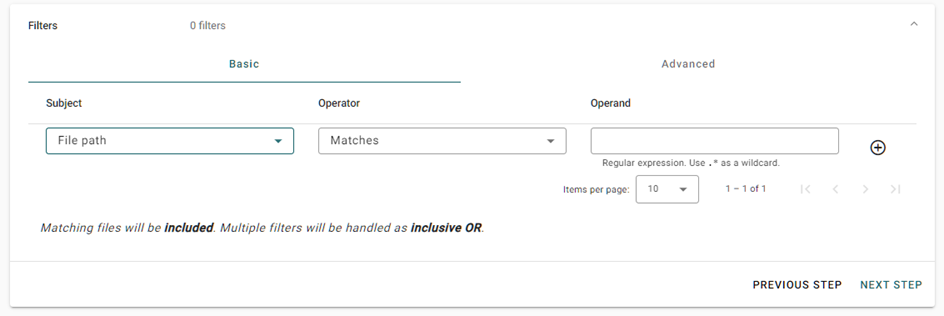
#### Based on File Name

The file name and path can be used in the filtering module.

<figure><img src="/files/081lYR1CrTKUzRel01Tk" alt=""><figcaption></figcaption></figure>

#### Based on File Extension

<figure><img src="/files/QgMkYy640sU2VtrJkED5" alt=""><figcaption></figcaption></figure>

#### Based on File Size

<figure><img src="/files/qUmnzU0zQk0etAgrcupB" alt=""><figcaption></figcaption></figure>

#### Based on Boolean Operators

&#x20;Boolean operators are available. Default operator is inclusive OR, different operators can be set.

<figure><img src="/files/u4s8UVHKsyhnsFS6Carz" alt=""><figcaption></figcaption></figure>

<figure><img src="/files/iVJLoCIvzZx6TD5IWU20" alt=""><figcaption></figcaption></figure>

### **Basic Mode** <a href="#filtering-basicmode" id="filtering-basicmode"></a>

This mode includes the capability to define expressions directly in the Console based on the following types:

<table><thead><tr><th width="206.33333333333331">Type of Filter</th><th width="215">Operator</th><th>Description</th></tr></thead><tbody><tr><td>Creation Date</td><td>Older Than<br>Earlier Than<br>Before<br>After </td><td><p>Filter the selection on when the file has been created. </p><p>It allows to select only files that have been created before or after a specific date.</p></td></tr><tr><td>File Name</td><td>Matches<br>Doesn't Match</td><td><p>It allows to filter the selection based on the name of the file.</p><p>Examples :<br>'.' for any type of character <br>'*' from 0 to infinite</p><p><em>Regex expressions are also supported.</em></p></td></tr><tr><td>File extension</td><td>Equal<br>Doesn't Match</td><td><p>It allows to filter your selection based on the file extension. </p><p>File extension name has to be defined. Example: pdf</p></td></tr><tr><td>File Path</td><td>Matches<br>Doesn't Match</td><td><p>It allows to filter your selection based on the folder(s) path.</p><p><em>Regex expressions are also supported.</em></p></td></tr><tr><td>Last access date</td><td>Older Than<br>Earlier Than<br>Before<br>After </td><td>Same but with a trigger on when the file has been accessed for the last time.</td></tr><tr><td>Last modification date</td><td>Older Than<br>Earlier Than<br>Before<br>After </td><td><p>Filter the selection on when the file has been modified for the last time. </p><p>It allows to select only files that have been modified before or after a specific date.</p></td></tr><tr><td>Size</td><td>More than<br>Less than</td><td>Filter the file selection based on the files size</td></tr></tbody></table>

### &#x20;**Advanced Mode**

This mode allows the usage of an online scripting editor to define advances filter which cannot be defined in using the simple graphical mode.

The scripting Language is "LUA" , which a known language , with online documentation available.

The scripting language supports :

* Logical Operator such as 'and' , 'or'
* Defined Functions

#### **Example of a LUA script**

```bash
--[[
This function is auto-generated.
By editing it, you might lose your filter configuration
when going back to "Basic" mode
--]]
function test ( file )
return
       filter_size(file, ">", 2344000)
       or
       filter_name(file, "\\b(\\w*archive\\w*)\\b")
       or
       filter_path(file, "\\b(\\w*archive\\w*)\\b")
       or
       filter_relative_date(file, "C", ">", 20, "D")
       or
       filter_relative_date(file, "M", ">", 20, "D")
       or
       filter_relative_date(file, "A", "<", 20, "D")
end
```

&#x20;

#### Standard filtering methods are available :

**Filtering by the size of the file**&#x20;

**Example of LUA code**

```bash
...
filter_size(file, ">", 2344000)
..
```

<table><thead><tr><th width="212">Result</th><th>The workflow will only process files with a size which is bigger than 234000KB</th></tr></thead><tbody><tr><td>file</td><td>Match the process file</td></tr><tr><td>">"</td><td>Comparison symbol</td></tr><tr><td>234000</td><td>File size</td></tr></tbody></table>

&#x20;

**Filtering by the name of the file**&#x20;

**Example of LUA code**

```bash
...
filter_path(file, "\\b(\\w*archive\\w*)\\b")
..
```

| **Results**                     | **The workflow will only process files which are located in folder with a name which contains "archive"** |
| ------------------------------- | --------------------------------------------------------------------------------------------------------- |
| file                            | Match the process file                                                                                    |
| "\\\b(\\\w\*archive\\\w\*)\\\b" | Regex expression                                                                                          |

&#x20;**Filtering by the creation date**&#x20;

**Example of LUA code**

```bash
...
filter_relative_date(file, "C", ">", 20, "D")
...
```

&#x20;

| **Result** | **The workflow will only process files with a creation date older or earlier than**     |
| ---------- | --------------------------------------------------------------------------------------- |
| file       | Match the process file                                                                  |
| "C"        | Relative to the Creation Date                                                           |
| ">"        | ">", "<" are available for (older than, earlier than)                                   |
| 20         | Number of Year, Month, Day, Hour, Minute, Second                                        |
| "D"        | "Y", "M", "D", "H", "M", "S" are available for (Year, Month, Day, Hour, Minute, Second) |

&#x20;

**Filtering by the modification date**

**Example of LUA code**

```bash
...
filter_relative_date(file, "C", ">", 20, "M")
...
```

| **Result** | **The workflow will only process files with an access date older or earlier than**      |
| ---------- | --------------------------------------------------------------------------------------- |
| file       | Match the process file                                                                  |
| "C"        | Relative to the Last Access Date                                                        |
| ">"        | ">", "<" are available for (older than, earlier than)                                   |
| 20         | Number of Year, Month, Day, Hour, Minute, Second                                        |
| "D"        | "Y", "M", "D", "H", "M", "S" are available for (Year, Month, Day, Hour, Minute, Second) |

Some addition information which can be helpful for using the feature :

* LUA WebSite : <https://www.lua.org/>
* LUA Online Script validation <https://www.tutorialspoint.com/execute_lua_online.php>
* REGEX Online validation : <https://regexr.com/>


---

# Agent Instructions
This documentation is published with GitBook. GitBook is the documentation platform designed so that both humans and AI agents can read, navigate, and reason over technical content effectively. Learn more at gitbook.com.

## Querying This Documentation
If you need additional information that is not directly available in this page, you can query the documentation dynamically by asking a question.

Perform an HTTP GET request on the current page URL with the `ask` query parameter:

```
GET https://docs.nodeum.io/data-archiving/console/data-mover-management/filtering-basic-or-advanced.md?ask=<question>
```

The question should be specific, self-contained, and written in natural language.
The response will contain a direct answer to the question and relevant excerpts and sources from the documentation.

Use this mechanism when the answer is not explicitly present in the current page, you need clarification or additional context, or you want to retrieve related documentation sections.
