# Services

### Check the healthy of services

> System -> Services

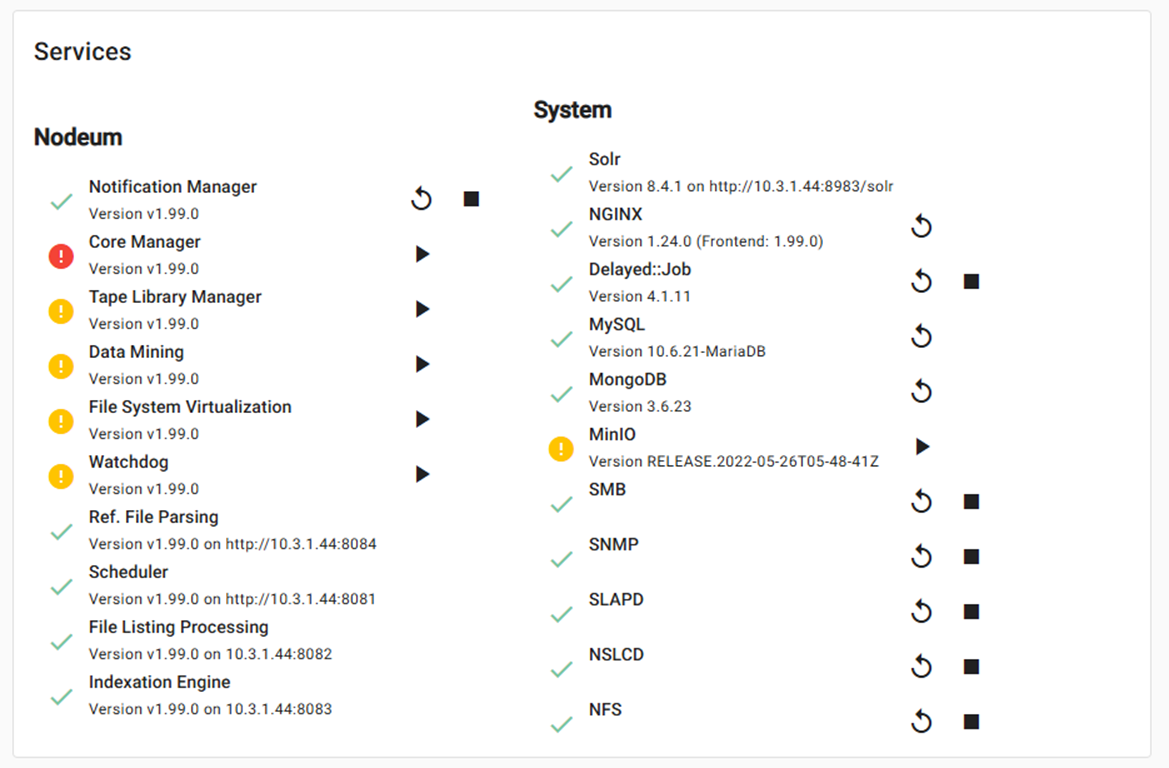
The administrators are easily check the healthy of Nodeum Services.&#x20;

All services are displayed.  It allows to monitor the state of each one and also to stop or start each service independently.&#x20;

Administrator can check the Nodeum services and the system services. &#x20;

### **Service Status**

* <mark style="color:green;">Green</mark> : service is running
* <mark style="color:yellow;">Yellow</mark> : The service is not running, but it is not required for normal
* <mark style="color:red;">Red</mark> : The service isn't running, but it's essential for normal operation.

| Information      | Description                                                    |
| ---------------- | -------------------------------------------------------------- |
| **Service Name** | This is the name of the service                                |
| **Version**      | This is the version of the service                             |
| **Actions**      | <ul><li>Restart the service</li><li>Stop the service</li></ul> |

<figure><img src="https://1946775891-files.gitbook.io/~/files/v0/b/gitbook-x-prod.appspot.com/o/spaces%2FgzbGsZqZH8Ro8zxRYgwn%2Fuploads%2FRJaIotm6DJY8EWAtDisG%2Fimage.png?alt=media&#x26;token=7135c8bd-25dd-48cf-ac8d-fa97fd7ebd61" alt=""><figcaption><p>System Service</p></figcaption></figure>

### Nodeum Services

<table><thead><tr><th width="238">Name</th><th width="376.1332600911458">Description </th><th>Mandatory</th></tr></thead><tbody><tr><td>Notification Manager</td><td>Service managing all Nodeum services supervision and inter-process communication handler</td><td>yes</td></tr><tr><td>Core Manager</td><td>Workflow Manager task orchestration and storage connection handler</td><td>yes</td></tr><tr><td>Tape Library Manager</td><td>Tape Library and Drive management</td><td>yes</td></tr><tr><td>Data Mining</td><td>Data Collector and handling system statistics analyses</td><td>yes</td></tr><tr><td>File System Virtualization</td><td>Provide global file system virtualization across storage node.</td><td>no</td></tr><tr><td>Watchdog</td><td>Service Monitoring Manager which executes the automatic restart of failing service</td><td>yes</td></tr><tr><td>Ref. File Parsing</td><td>Service which handles the xml/json file parsing</td><td>no</td></tr><tr><td>Scheduler</td><td>Task Scheduling service which manages execution of task at selected time.</td><td>yes</td></tr><tr><td>File Listing Processing</td><td>Service that manages the Primary Storage mounting and its content parsing and inventory.</td><td>yes</td></tr><tr><td>Indexation Engine</td><td>Service that sync the database with the system and index the contents</td><td>no</td></tr></tbody></table>

&#x20;System Services

<table><thead><tr><th width="155.33333333333331">Name</th><th width="393">Description</th><th>Mandatory</th></tr></thead><tbody><tr><td>Solr</td><td>Content Indexation Engine which provides fast access at each content</td><td>yes</td></tr><tr><td>NGINX</td><td>HTTP Web Service</td><td>yes</td></tr><tr><td>Delayed: Job</td><td>It executes tasks as a background process in Rails environment. It increases page rendering speed when asynchronous jobs are processed in the background. </td><td>yes</td></tr><tr><td>MySQL</td><td>Database Management</td><td>yes</td></tr><tr><td>MongoDB</td><td>Database Management</td><td>yes</td></tr><tr><td>MinIO</td><td>Data Transport - S3 Frontend Service</td><td>no</td></tr><tr><td>NFS</td><td>Data Transport - NFS Service</td><td>yes</td></tr><tr><td>SMB</td><td>Data Transport - SMB Service</td><td>yes</td></tr><tr><td>SNMP</td><td>Monitoring  - SNMP Service</td><td>yes</td></tr><tr><td>SLAPD</td><td>Authentication - SLAPD Service</td><td>yes</td></tr><tr><td>NSLCD</td><td>Authentication - NSLCD Service</td><td>yes</td></tr></tbody></table>
