> For the complete documentation index, see [llms.txt](https://docs.nodeum.io/llms.txt). Markdown versions of documentation pages are available by appending `.md` to page URLs; this page is available as [Markdown](https://docs.nodeum.io/data-archiving/hybrid-storage-management/tape-library-management/task-maintenance-for-tapes.md).
# Task Maintenance for Tapes
#### Tape Library Maintenance
Nodeum provides various tape library maintenance services, including:
* **LTFS Media Formatting**: Prepares tapes for use with the Linear Tape File System (LTFS).
* **LTFS Media Scanning**: Conducts scans to ensure tapes are properly configured for LTFS.
* **LTFS Tape Media Consistency Check**: Verifies the integrity and consistency of tape media.
Task maintenance
### Format a media in LTFS
#### Preparing Tape Media for Nodeum
To use a tape with Nodeum, format the media through the appliance using LTFS. This allows immediate use. You can format a single tape, multiple tapes, or an entire pool. In the task settings, you can choose to assign the tape to the Scratch pool after successful formatting. By default, tapes added to the library are not assigned to any pool.
{% hint style="danger" %}
Formatting a tape will delete all current content. Proceed carefully.
{% endhint %}
### Import a LTFS Tape
#### How to import into Nodeum a LTFS Tape ?
If you have been using the LTFS protocol with your tape library and want to import your data set into Nodeum, follow these steps.
#### Procedure to Import a Tape into Your Library
1. Insert the tape into your tape library.
2. Create a maintenance task to scan the LTFS media.
3. Launch the task.
| Source | Type of action Mover |
| ------ | -------------------- |
| Tapes | Scan an LTFS Media |
#### Result after the task processed with success
1. Information are known by Nodeum
2. Information are display in all metrics (tape reporting, tape Overview, Catalog
3. Information on tape can be easily reloaded
**Benefits:**
* Efficiently catalog data, reducing the need for tape-to-tape migrations.
* Enhance team productivity.
* Streamline LTFS Appliance migration.
* Benefit from a transparent process with Nodeum-validated Scalar LTFS migration.
* Facilitate content exchange with customers or partners.
### Scan a LTFS Media
Automatically scan and catalog content from LTFS Tape into the Nodeum catalog. This workflow enables the re-importation of previously written tapes.
To import LTFS Tapes into Nodeum, follow these steps :
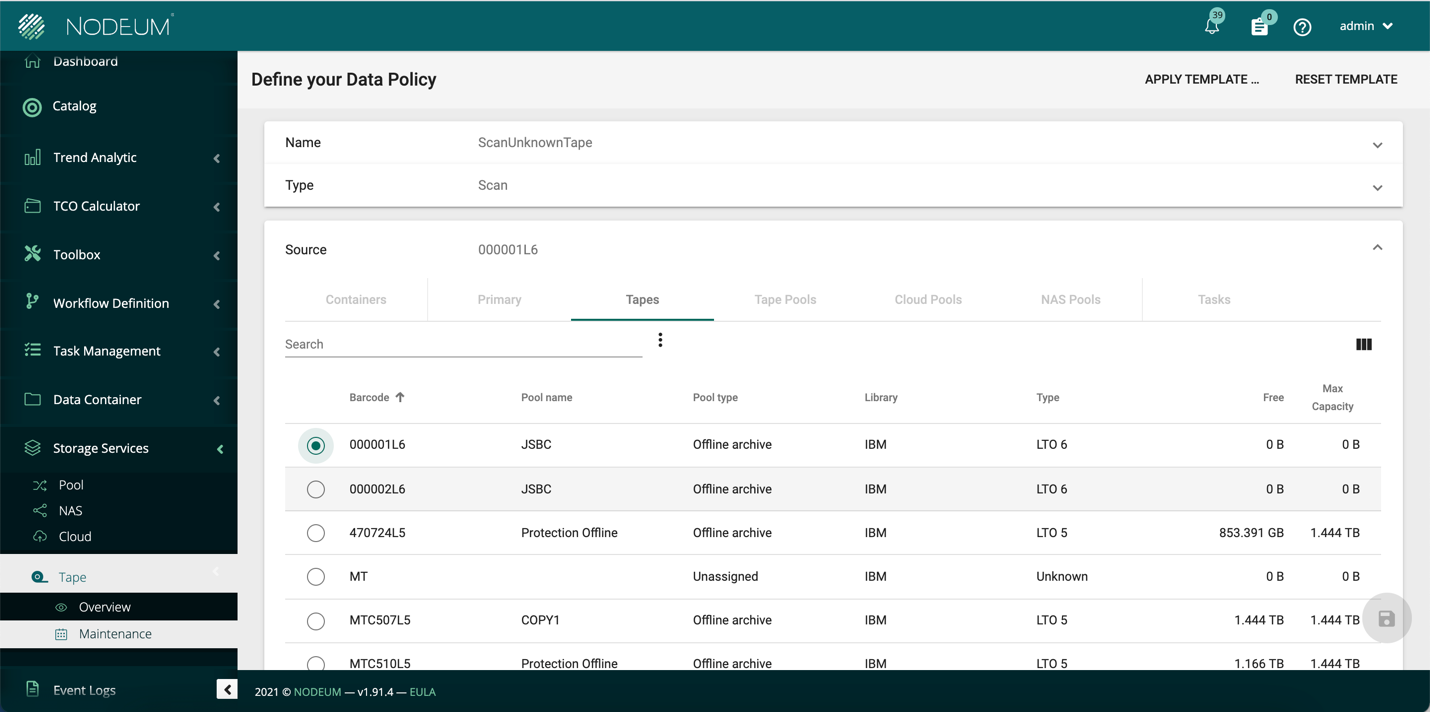
Add the LTFS TAPE 000001L6 in the tape library connected to Nodeum
#### Define a workflow to scan the LTFS TAPE and then execute it
* Select Scan an LTFS Media
* Select as the source the tape need to scan "Tape “000001L6"
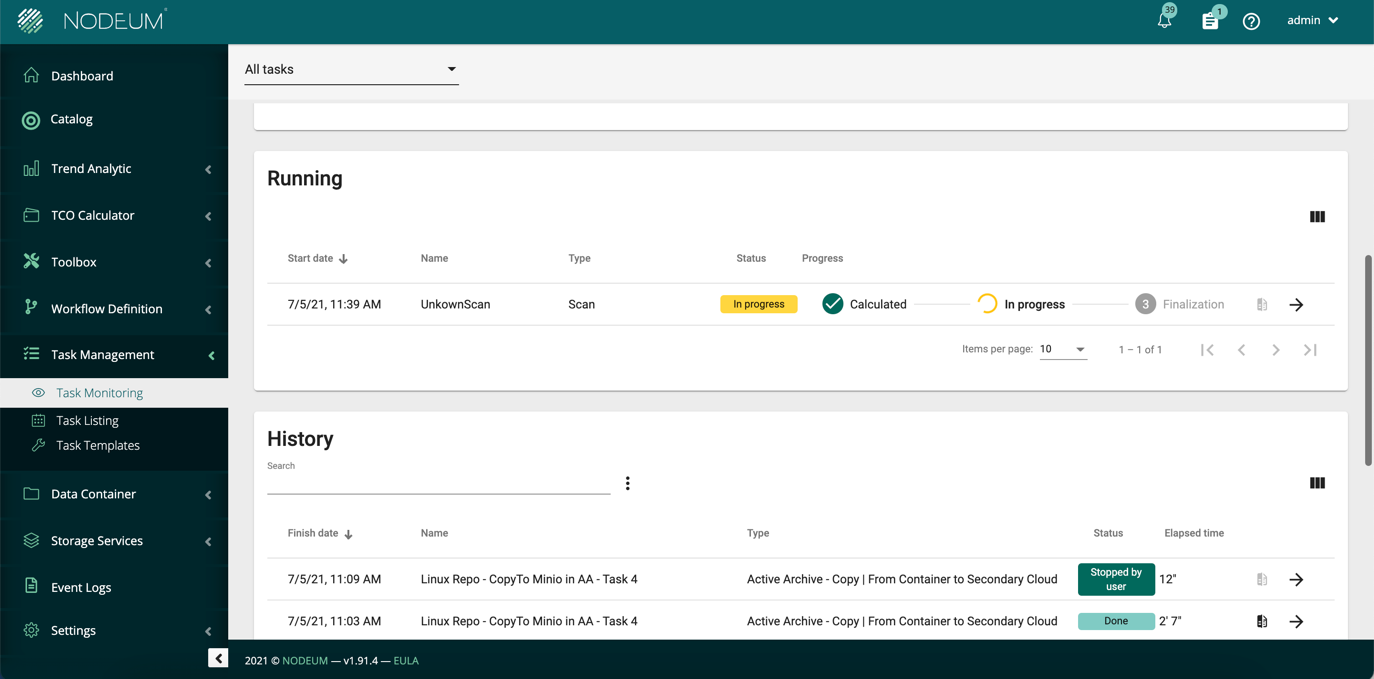
* Launch the task
#### Get the result after the task execution
* Data are indexed and recognized by Nodeum without reading the complete tape
* The tape have to be placed in a pool offline and can only be used in an offline archive workflow.
* Metadata are injected in the catalog
* End user can see and retrieve easily the contents (files, images, video)
* End user accesses contents straight away; no need to make new set of tapes
### Tape Rehydratation
When files are deleted from a tape, they are not fully erased. A rehydration task is needed for complete erasure, which enhances performance and user experience.
Nodeum does not delete or modify files on the tapes; instead, catalog entries are removed for deletions, and new versions are written while index pointers are updated for modifications. Files remain physically intact on tapes.
Consequently, frequent deletions or updates can imbalance the free space to consumed space ratio on these tapes.
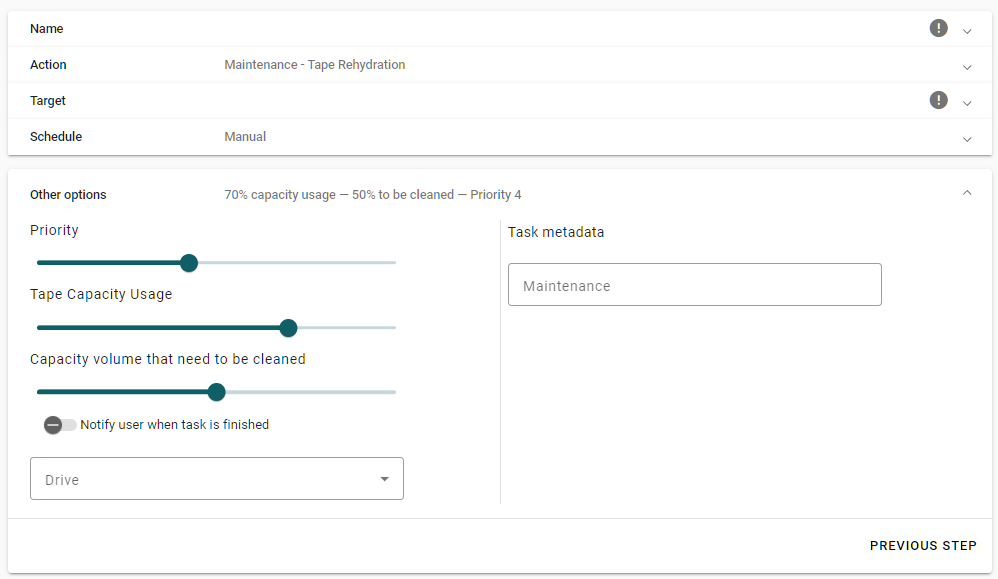
#### **Go in the menu Storage Services/Tape/Maintenance**
Complete the form:
1. Define the task name and comments
2. Select the Action: Rehydration
3. Choose one or several tapes
4. Schedule the Task
5. Define Other Options
#### **Task Priority Guidelines**
* The highest priority level is 10. Assign a priority of 10 for tasks deemed most critical.
* Priority levels range from 1 (lowest) to 10 (highest).
* In cases with multiple simultaneous tasks, higher priority tasks will execute first.
* Clearly specify the task's priority level when scheduling.
#### **Tape Capacity Usage**
This value is expressed as a percentage.\
The workflow activates when the tape reaches this specified reclaimable capacity.
#### **Capacity volume that need to be cleaned**
When the reclaimable capacity on the tape reaches a certain percentage, the workflow will be triggered.
{% hint style="info" %}
This two last options are very important to be set to get the space reclamation you are looking for.
{% endhint %}
### Check tape media consistency
#### LTFS Consistency Check
This feature verifies the consistency of LTFS media. A volume is deemed consistent when both partitions are complete, and the last index in the Index Partition references the last full index in the Data Partition. If inconsistencies are found, media recovery using the `ltfsck` command is recommended.
`ltfsck` is a diagnostic and recovery utility for LTFS-formatted tapes. It verifies the integrity of tape metadata and indexes, detects corruption, and rebuilds corrupted or missing index partitions. When tape data cannot be accessed normally, `ltfsck` can reconstruct the filesystem structure, making tape contents recoverable even when the primary index is damaged.
`Go to Storage Services | Tape | Maintenance`
Choose the Check media consistency and select the tape you need to verify
{% hint style="warning" %}
LTFS maintains multiple index copies on tape; if index corruption occurs, `ltfsck` can roll back to the last known good index partition. Note that rolling back to a previous index will result in data loss — any files or changes written after that index point will be lost.
{% endhint %}
**Manual Recovery:**
* If the NODEUM check consistency fails to recover the tape, run `ltfsck` manually with recovery mode enabled. This operation is particularly effective when the tape's primary index is corrupted but data blocks remain intact
* For severely damaged tapes, manual `ltfsck` with verbose logging (`-v`) helps identify which data blocks are still recoverable
* Making this manual operation required to have a full control of the tape library. If tape library is used by NODEUM, it requires to set the software in maintenance, stop the Tape Library and Watchdog services, and mount the tape to a drive manually through the Tape Library Web UI. Then launch the `ltfsck` check command.
---
# Agent Instructions
This documentation is published with GitBook. GitBook is the documentation platform designed so that both humans and AI agents can read, navigate, and reason over technical content effectively. Learn more at gitbook.com.
## Querying This Documentation
If you need additional information that is not directly available in this page, you can query the documentation by asking a question.
Perform an HTTP GET request on the following URL with the `ask` and `goal` query parameters:
```
GET https://docs.nodeum.io/data-archiving/hybrid-storage-management/tape-library-management/task-maintenance-for-tapes.md?ask=&goal=
```
`ask` is the immediate question: it should be specific, self-contained, and written in natural language.
`goal` is what the user is ultimately trying to achieve, the reason they need the answer. Sharing it helps GitBook give you a better, more relevant answer. A goal is most helpful when it describes the outcome the user wants rather than restating the question. For example, with `ask=how do I create an API token`, a goal like `automate deployments from our CI pipeline` lets GitBook tailor the answer to that use case.
The response will contain a direct answer to the question and relevant excerpts and sources from the documentation.
Use this mechanism when the answer is not explicitly present in the current page, you need clarification or additional context, or you want to retrieve related documentation sections.