> For the complete documentation index, see [llms.txt](https://docs.nodeum.io/llms.txt). Markdown versions of documentation pages are available by appending `.md` to page URLs; this page is available as [Markdown](https://docs.nodeum.io/data-mover/console/system-settings/license-application.md).
# License Application
This is about the explanation about how Nodeum license has to be applied to get the software properly running
## Prerequisites
To generate properly a license, it is important to retrieve the Serial Number of each available node(s).
This information can be found in the Nodeum Console in going in this menu:
> System -> License
If the Nodeum Console is not available or cannot be reached, it is always possible to get the Serial Number through the system UUID in executing this command:
```bash
$ cat /sys/class/dmi/id/product_uuid
423e05fd-b126-4ac5-eb87-84868938e049
```
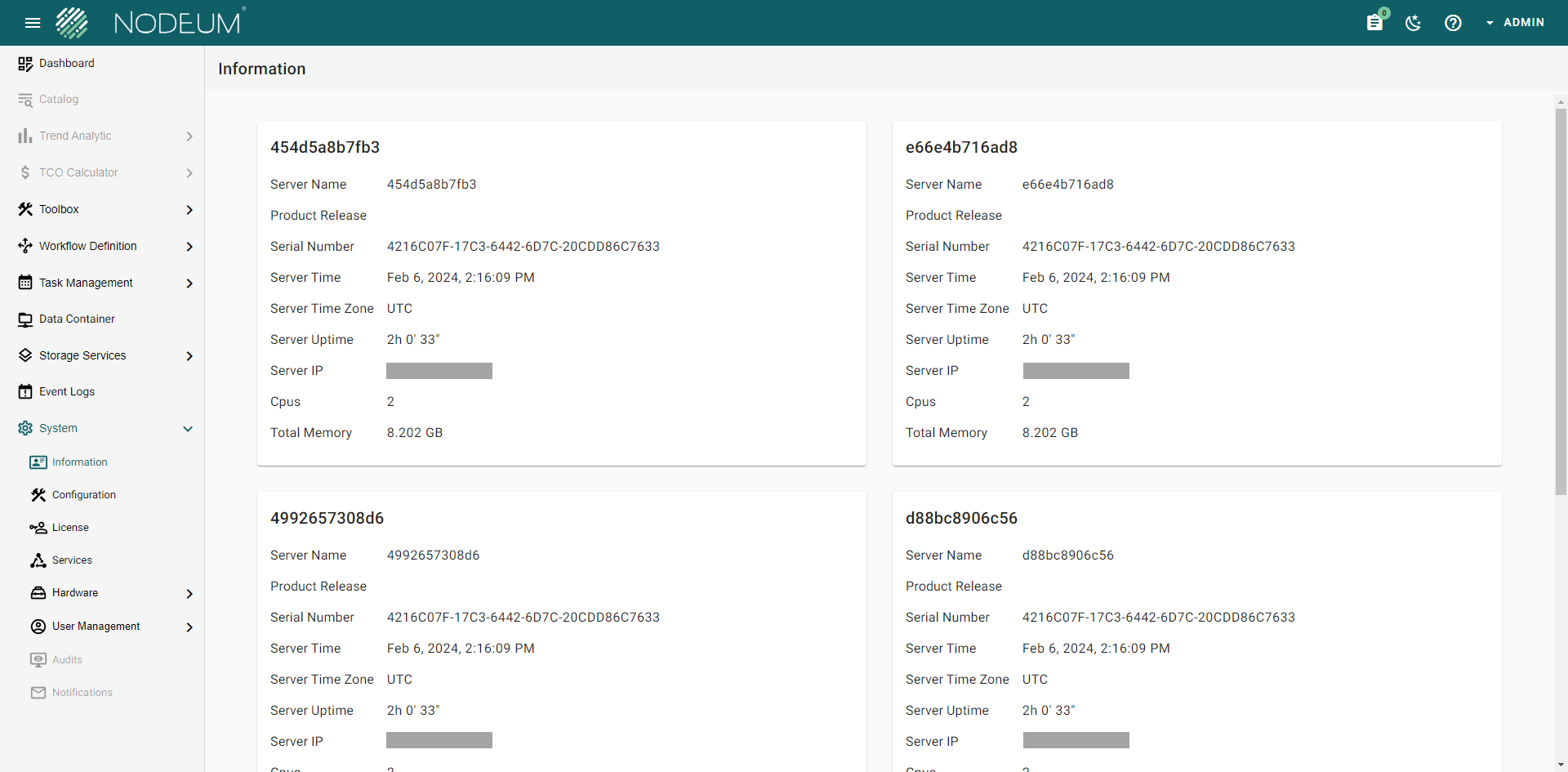
In a Docker environment, the Serial Number can also be retrieved, either in reaching the Nodeum Console:
Nodeum System Information when running in a Docker
\
Or also directly from the Container itself:
```bash
$ docker ps
CONTAINER ID IMAGE COMMAND CREATED STATUS PORTS NAMES
e66e4b716ad8 nodeum/data-management:v2.0.7 "dispatcher --config…" About an hour ago Up 38 minutes nodeum-v2-dispatcher-1
f64d9c3072b6 nodeum/web:v2.0.7 "/sbin/my_init" About an hour ago Up 38 minutes 443/tcp, 0.0.0.0:8080->80/tcp, :::8080->80/tcp nodeum-v2-web-1
d88bc8906c56 nodeum/data-management:v2.0.7 "mover --config_file…" About an hour ago Up 38 minutes nodeum-v2-mover-1
6819d6b0e0d5 nodeum/data-management:v2.0.7 "front --config_file…" About an hour ago Up 38 minutes nodeum-v2-front-1
454d5a8b7fb3 nodeum/data-management:v2.0.7 "cache --config_file…" About an hour ago Up 38 minutes nodeum-v2-cache-1
4992657308d6 nodeum/data-management:v2.0.7 "monitoring --config…" About an hour ago Up 38 minutes nodeum-v2-monitoring-1
e4a320462068 nodeum/data-management:v2.0.7 "scheduler --config_…" About an hour ago Up 38 minutes nodeum-v2-scheduler-1
4096070e10ea nodeum/fluentd:v2.0.7 "tini -- /bin/entryp…" About an hour ago Up 38 minutes 5140/tcp, 0.0.0.0:24224->24224/tcp, 0.0.0.0:24224->24224/udp, :::24224->24224/tcp, :::24224->24224/udp nodeum-v2-fluentd-1
3717791774fd redis:6.2.6 "docker-entrypoint.s…" About an hour ago Up 38 minutes 0.0.0.0:32831->6379/tcp, :::32772->6379/tcp nodeum-v2-redis-1
8979ab1dd718 mariadb:10.6 "docker-entrypoint.s…" About an hour ago Up 38 minutes 0.0.0.0:32830->3306/tcp, :::32771->3306/tcp nodeum-v2-mariadb-1
901dcaab39af quay.io/coreos/etcd:v3.5.8 "etcd --advertise-cl…" About an hour ago Up 39 minutes 2379-2380/tcp nodeum-v2-etcd1-1
6beebc60013a mongo:4.4 "docker-entrypoint.s…" About an hour ago Up 38 minutes 0.0.0.0:32832->27017/tcp, :::32773->27017/tcp nodeum-v2-mongo-1
$ docker exec -it e66e4b716ad8 cat /sys/class/dmi/id/product_uuid
4216C07F-17C3-6442-6D7C-20CDD86C7633
```
{% hint style="danger" %}
The list of Serial Number has to be send to Nodeum team for getting the Nodeum Software License key.
{% endhint %}
## License Application
Once the Nodeum Software License key has been received, it can be applied in using the Nodeum Console or in using the Nodeum ND Client (available in the next ND 2.0.8 release).
> System -> License
Click on the button "UPLOAD LICENSE" to load the provided Software License key. Once done the License is applied.
---
# Agent Instructions
This documentation is published with GitBook. GitBook is the documentation platform designed so that both humans and AI agents can read, navigate, and reason over technical content effectively. Learn more at gitbook.com.
## Querying This Documentation
If you need additional information that is not directly available in this page, you can query the documentation by asking a question.
Perform an HTTP GET request on the following URL with the `ask` and `goal` query parameters:
```
GET https://docs.nodeum.io/data-mover/console/system-settings/license-application.md?ask=&goal=
```
`ask` is the immediate question: it should be specific, self-contained, and written in natural language.
`goal` is what the user is ultimately trying to achieve, the reason they need the answer. Sharing it helps GitBook give you a better, more relevant answer. A goal is most helpful when it describes the outcome the user wants rather than restating the question. For example, with `ask=how do I create an API token`, a goal like `automate deployments from our CI pipeline` lets GitBook tailor the answer to that use case.
The response will contain a direct answer to the question and relevant excerpts and sources from the documentation.
Use this mechanism when the answer is not explicitly present in the current page, you need clarification or additional context, or you want to retrieve related documentation sections.